cPGuard integration with Enhance Control Panel

cPGuard integration with Enhance Control Panel

We are so happy to announce that cPGuard integration with Enhance control panel is enabled from version 4.65. We have been working hard over the past weeks to complete the supporting scripts in the standalone version and now almost all functions will work fine on Enhance servers.

More about Enhance Control Panel

Enhance is a comprehensive multi-server, website, and customer automation platform designed for web hosting companies and web agencies. Unlike the conventional panels, they use dockerized containers to run services and thus claim more security and isolation for websites. You may find more about them on their official website 

Is there a limitation in the integration?

Right now there is no major limitation except WAF support in Apache because ModSecurity is not enabled in their Apache docker container. Once Enhance can support ModSecurity with Apache, we will add support for that. Right now WAF can work fine with Litespeed and OpenLiteSpeed

All other major modules will work fine and we are still releasing updates/patches for all new issues reported.

How to install cPGuard on your Enhance server?

The cPGuard installation is pretty straight forwards as always…it only needs a few additional pieces of information compared to the regular Standalone installation. You may find the details installation instructions in our KB  …the installation is quick and rather easy.

We would like to thank MediaServe LLC  for providing us with the development platform and integration assistance for Enhance. Their valuable feedback in each stage helped us to make the integration fast and accurate.

Vulnerability fixed in WordPress Elementor Pro plugin – How cPGuard handles it

Vulnerability fixed in WordPress Elementor Pro plugin – How cPGuard handles it

The vulnerability

As many of you are aware already, there is a critical vulnerability reported in the WordPress Elementor Pro plugin, which is installed on millions of websites. Though they have already released a patched version already, there are still many websites left unpatched, and active attack campaigns are going on against the WordPress websites. The vulnerability, which impacts version 3.11.6 and all older versions, allows logged-in normal users, like customers or site members, to change the website settings, create new admin users, change the site URL, etc.

What did we notice about this attack campaign?

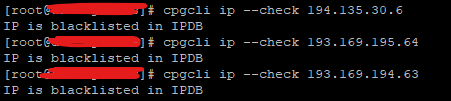
Based on some reliable sources, most of the attack campaigns were started from the following IPs

  • 193.169.194.63
  • 193.169.195.64
  • 194.135.30.6

Upon investigating this further and checking the logs, we have noticed some attack attempts since 24th March 2023 and our WAF was blocking them without any specific rule added for this particular vulnerability ( our WAF rules are so generic to block many of the common abuse attempts ).

After multiple attack attempts against the servers within the cPGuard network, the IPDB system has caught it on the central system and blocked on all client servers where IPDB is enabled. Given below are a few relevant screenshots of the given incidents.

So what else we did do to protect servers from this vulnerability?

Even if we found that the automated attack attempts are already being blocked by the WAF and IPDB, we have released a WAF update today specifically to block exploiting this vulnerability specifically. We are still monitoring the servers and logs and we will amend the WAF rules as we get more pieces of evidence and logs.

It is also recommended to advise your customers and update the plugin to version 3.11.7 or higher as it is available.

Find malware in  a cPanel user account

Find malware in a cPanel user account

What is malware in web hosting?

Malware is a generic term for any type of malicious software written specifically to harm a network, system, or user. In the web hosting domain, this usually means a back door, an injection, or a phishing kit that is uploaded to a user account and abuses the resources to distribute the attack. Mostly in a PHP web hosting environment, this happens due to a vulnerability in the web application or due to a compromised user password

Common impacts of malware-infected websites

 Once the account/website is infected, you may experience various issues like phishing content in the website, email spam originating scripts, scripts sending outbound attacks, server load spikes, etc. Such issues will eventually affect the reputation of your server IP address, and websites, and may cause abuse complaints as well. 

 How cPanel scanner engine can help to solve this?

We have developed cPGuard scanner engine to closely watch the file events under each account and scan them automatically. There are also daily and weekly scanner options to schedule the latest files ( which are enabled by default ) with the updated virus rules. That said, we constantly update the virus file detection rules and the scheduled scan will help to recheck the latest files with the updated rules set periodically.

Our scanner engine is carefully crafted specifically for Web Hosting PHP websites and it is one of the fastest, less resource-consuming scanners with the best results overall. 

How to detect malware under cPanel account using cPGuard manual scan

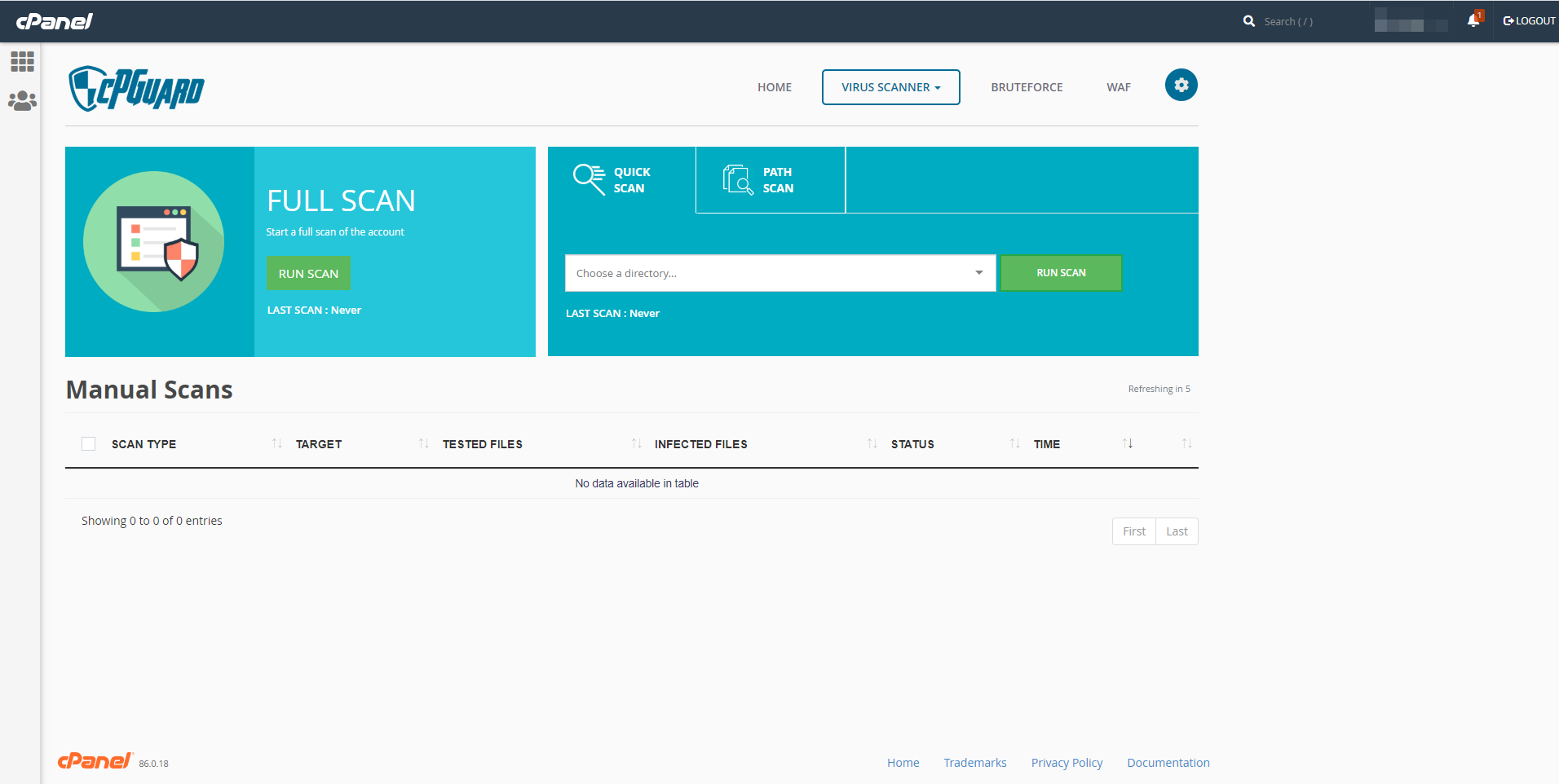
As mentioned already above, it is recommended to keep the automatic scanner turned on always for safer web space. If you detect any abuse on your account and want to scan files manually, you can do it either from the cPanel plugin or from the App Portal   

 1. From App Portal   , you need to go to the server on which the account is hosted,  go to Virus Scanner >> Manual Scan and there you can choose the account or enter the path to scan.

2. From cPanel , you can go to Security >> cPGuard and then you will have the option to scan your files.

Conclusion 

The cPGuard scanner is a very useful tool for web hosts and account holders to detect the malware files under their accounts. Together with the automatic files scanner, Web Application Firewall, IPDB Firewall, Reputation monitoring tools, etc cPGuard helps to keep all cPanel server safe and secure. 

DirectAdmin ModSecurity Web Application Firewall – DirectAdmin WAF 

DirectAdmin ModSecurity Web Application Firewall – DirectAdmin WAF 

What is Web Application Firewall ( WAF )?

A web application firewall (WAF) is a security layer that can work with your web server or in front of your web server that monitors and filters incoming traffic to the web application. The duty of the WAF is to block malicious traffic, and bots while allowing legitimate traffic through. With a proper WAF, you may eliminate most of the web security threats against your websites or web applications and can avoid compromised websites on your server.

Importance for Web Application Firewall in DirectAdmin

The actual duty of WAF is to secure websites/web applications from web attacks and malicious access. On a DirectAdmin server where people normally host multiple websites, thus a security layer like WAF is essential because there must be multiple types/versions of web applications and frameworks installed on the same server. On many such servers, the installed Web Applications may contain known or unknown vulnerabilities which are the key for hackers to gain access to the website or the user account. With a proper Web Application Firewall, we can stop most of such website vulnerability scanners, general web attack attempts, and website compromise, and eventually helps to reduce server load/overhead and save server admin time. It is easy to enable and manage cPGuard WAF on  a DirectAdmin server we provide complete support for the integration and log management.

cPGuard WAF

The cPGuard WAF is powered by Malware.Expert Commercial ModSecurity rules set and tuned for shared hosting servers. It is written from scratch based on the real-world analysis of websites for over 10 years and can block most generic and targeted attacks. It can block most of the generic  attacks against Web Server and PHP, broken out into the following attack categories:

  • SQL injection
  • Cross-site Scripting (XSS)
  • Local File Include
  • Remote File Include
  • File upload vulnerabilities
  • Zero-Day attacks
  • Web shells executions
  • Captcha verification

It also has optimized application-specific Mod_Security rules, covering the same vulnerability classes for applications such as:

  • WordPress
  • Joomla
  • Drupal etc

How cPGuard WAF can help to block web attacks and reduce server load?

The cPGuard WAF has various rules set, which you can enable optionally based on your preference. The rules together can stop bad bot access, completely stop WordPress login page/ xmlrpc.php attacks using the unique captcha system, and block generic attacks.

For example, you may not need to worry about SQL injection attacks after enabling cPGuard WAF. This is a major issue, especially for WordPress plugins where such vulnerabilities are reported quite often ( recent examples are CVE-2023-23488, CVE-2023-23489, and CVE-2023-23490 ). You can be worry-free and do not need to follow it and force the users to patch them to avoid a compromised website.

How to enable cPGuard WAF?

To install and enable cPGuard WAF, you may need to purchase and install cPGuad first on your server. After installing cPGuard on your server, you may refer to this help article and enable WAF on your server. It is easy to enable – disable WAF with a few clicks. You also have the flexibility to enable/disable selective WAF rules set for specific types of attacks. You can view the WAF logs from App Portal and each user can view the web attacks against their websites from their user plugin available in DirectAdmin.

Conclusion

The cPGuard WAF is the cost-effective and efficient WAF and Security Plugin available now for your DirectAdmin server. It is compatible with all web servers supported in DirectAdmin and enables seamless integration with them. The cPGuard WAF can automate malware scans, web attack mitigation, and distributed attacks, and can help to reduce server load and total time to manage servers. We have 30 days free trial using which you can try the solution without payment…it is also the cheapest security suite even after the trial period. 

cPanel ModSecurity Web Application Firewall – cPanel WAF

cPanel ModSecurity Web Application Firewall – cPanel WAF

What is Web Application Firewall ( WAF )?

A web application firewall (WAF) is a security layer that can work with your web server or in front of your web server that monitors and filters incoming traffic to the web application. The duty of the WAF is to block malicious traffic, and bots while allowing legitimate traffic through. With a proper WAF, you may eliminate most of the web security threats against your websites or web applications and can avoid compromised websites on your server. 

Web Application Firewall for cPanel 

As mentioned above, the actual duty of WAF is to secure websites and web applications from web attacks and malicious access. On a cPanel server where people normally host multiple websites, a security layer like WAF is essential because there must be multiple web applications and frameworks installed on the same server. On such servers, the installed Web Applications may contain known or unknown vulnerabilities which are the key for hackers to gain access to the website or the user account. With a proper Web Application Firewall, we can stop most of such website vulnerability scanners, general web attack attempts, and website compromise and eventually helps to reduce server load/overhead and save server admin time

cPGuard WAF

The cPGuard WAF is powered by Malware.Expert Commercial ModSecurity rules set and tuned for shared hosting servers. It is written from scratch based on the real-world analysis of websites for over 10 years and can block most generic and targeted attacks. It can block most of the generic  attacks against Web Server and PHP, broken out into the following attack categories:

SQL injection
Cross-site Scripting (XSS)
Local File Include
Remote File Include
File upload vulnerabilities
Zero-Day attacks
Web shells executions
Captcha verification

It also has optimized application-specific Mod_Security rules, covering the same vulnerability classes for applications such as:

WordPress
Joomla
Drupal
etc


How cPGuard WAF can help to block web attacks and reduce server load?

The cPGuard WAF has various rules set, which you can enable optionally based on your preference. The rules together can stop bad bot access, completely stop WordPress login page/ xmlrpc.php attacks using the unique captcha system, and block generic attacks.

For example, you may not need to worry about SQL injection attacks after enabling cPGuard WAF. This is a major issue, especially for WordPress plugins where such vulnerabilities are reported quite often ( recent examples are CVE-2023-23488, CVE-2023-23489, and CVE-2023-23490 ). You can be worry-free and do not need to follow it and force the users to patch them to avoid a compromised website. 

How to enable cPGuard WAF?

To install and enable cPGuard WAF, you may need to purchase and install cPGuad first on your server. After installing cPGuard on your server, you may refer to this help article and enable WAF on your server. It is easy to enable – disable WAF with a few clicks. You can also view the WAF logs from App Portal and each user can view the web attacks against their websites from their user plugin available in cPanel.


Conclusion 

The cPGuard WAF is the cost-effective and efficient WAF and Security Plugin available now for your cPanel server. It can automate malware scans, web attack mitigation, and distributed attacks, and can help to reduce server load and total time to manage servers. We have 30 days free trial using which you can try the solution without payment…it is also the cheapest security suite even after the trial period.